Somewhere near you, tonight, someone is going to pick up their phone and type "churches near me."
They won't search your church by name — they don't know your name yet. They'll type the kind of thing a stranger types: churches near me. baptist church near me. churches in [your town]. And in about half a second, Google will hand them a short list, with a little map, of the churches it thinks are nearby and worth showing.
The only question that matters is whether your church is on that list — and whether what they see makes them want to come.
That list is built from something called a Google Business Profile. It's free. It takes an evening to set up. And it is, quietly, one of the most effective front doors your church has. Let me show you what I mean — with real numbers from my own church.
What a Google Business Profile Actually Is
You've seen these your whole life without naming them. When you search a business on Google — or look one up on Google Maps — the panel that appears with the hours, the photos, the directions button, the reviews, the phone number? That's a Business Profile. It's the box, and the map pin, that Google shows before anyone clicks a single website.
For a church, it's the difference between being findable and being invisible. A person searching "churches near me" is shown a map with pins and profiles. If you don't have one — or yours is half-empty and unclaimed — you're simply not in the running, no matter how faithful your church is.
And here's the part that surprises most pastors: it's completely free, and Google will even tell you exactly how it's working.
One Month, One Small Church
This isn't theory. Here's the actual performance summary Google sent me for Westview Baptist Church — my own church, in Warren, Michigan — for a single month.
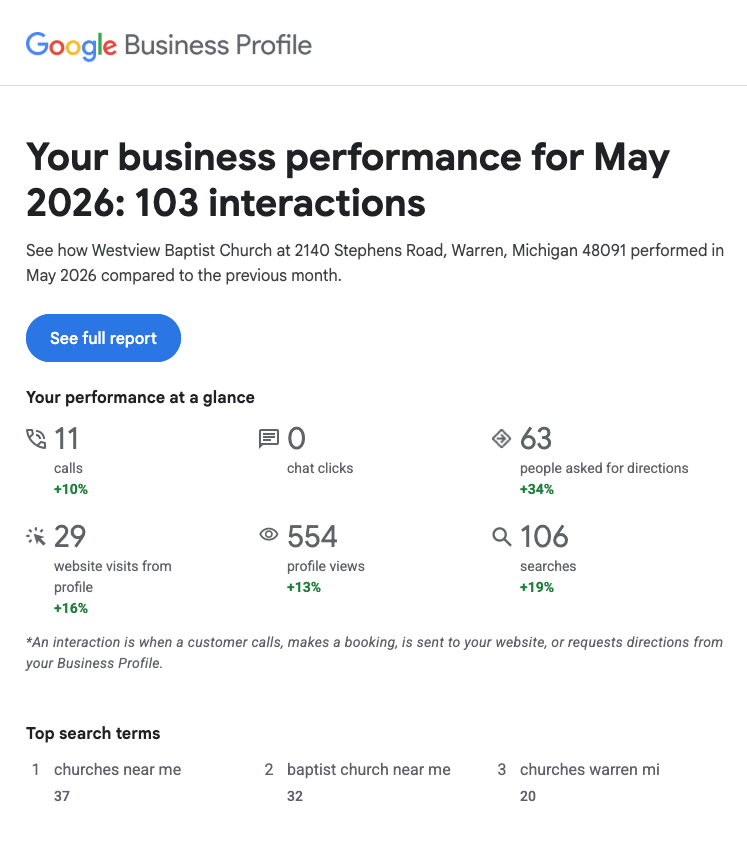
Look at that. In one month: 554 people viewed the profile. 63 asked for driving directions. 11 called the church. 29 clicked through to the website. A hundred and three real interactions — people deciding, in some small way, to come closer.
For a single small church, that's not a vanity number. Sixty-three sets of directions is sixty-three people who pointed their car at the building. Eleven phone calls is eleven conversations that started because the number was one tap away. None of it cost a dollar in advertising.
They Weren't Looking For You. They Were Looking For A Church.
Now look at how people found the profile — and what they typed to get there.
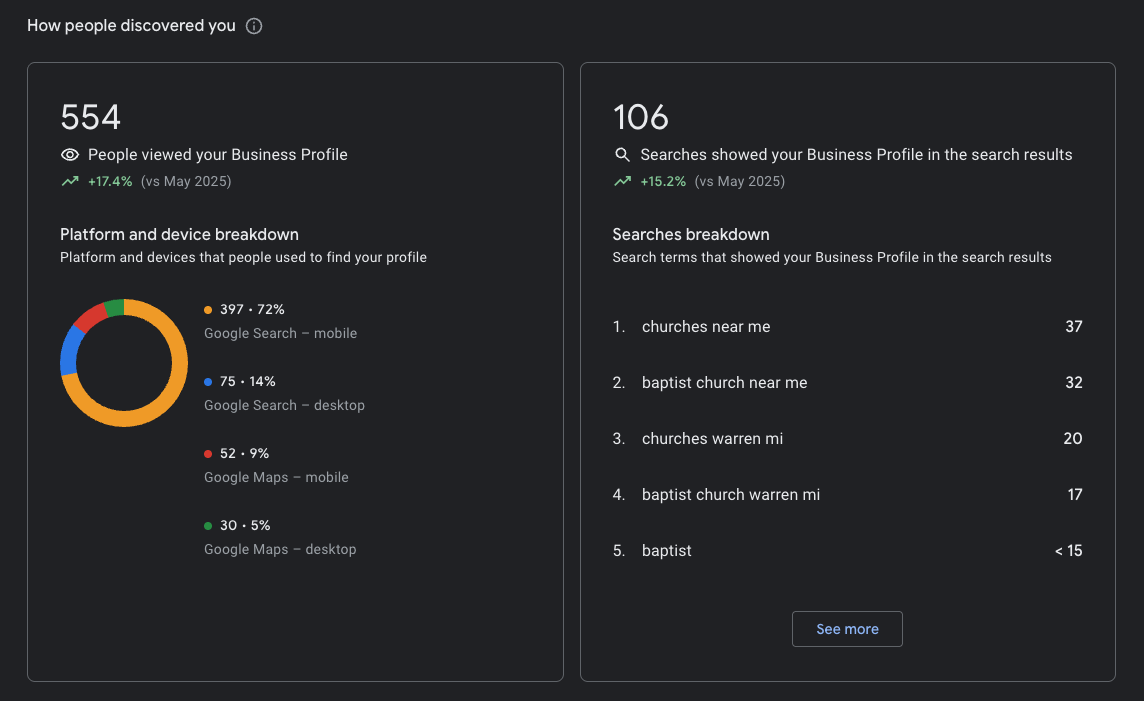
This is the whole point, in one screenshot. The top searches that surfaced the church were "churches near me" (37 times), "baptist church near me" (32), "churches warren mi" (20). Almost nobody typed "Westview Baptist Church." They typed what a lost, curious, or relocating person types when they don't yet have a church — and Google connected them to one that does preach the gospel.
And 72% of them were on a phone, mid-search. Not at a desk doing research. On the couch, in a parking lot, in bed at 11 p.m. The Business Profile met them in that exact moment.
You cannot manufacture that kind of reach with a bulletin or a yard sign. It's the modern version of a stranger driving past and noticing your steeple — except now the "driving past" happens on a phone, and your steeple is your Google profile.
Think of It as Putting Out Tracts
We already believe in this work. We just haven't named it.
For generations, faithful churches have done the unglamorous labor of being findable: leaving tracts in the diner and the gas station, knocking on doors, taking out the ad in the Yellow Pages, standing on the corner so that the one soul God was drawing would have something to reach for. We never did it because it was comfortable. We did it because the lost don't come looking in the obvious places, and love goes to where people actually are.
Setting up a Google Business Profile is that same instinct, moved to where people now stand. The street corner is the search bar. The tract rack is the map. When you fill out that profile — the photo of the building, the service times, the address, the invitation to come — you are doing in 2026 exactly what a faithful church has always done: making yourself available to a stranger in the moment they're reaching, so that when they reach, someone is there.
It isn't marketing. It's witness. It's a tract placed precisely where the searching hand will land — except this one was picked up by 554 people last month, without anyone leaving the building. The work is the same as it ever was; only the corner has moved.
Why It Matters for Churches Specifically
- It's free, and it shows up at the decisive moment. Right when someone is actively looking for a church, you appear — with no ad budget.
- It removes friction. Directions, a tap-to-call number, service times, and a website link are all one touch away. You saw what that did: 63 directions, 11 calls.
- Photos build trust before they ever visit. A warm photo of your building means a first-timer recognizes it from the road and knows they're in the right place. Anxiety down, courage up.
- Reviews are quiet testimonies. A few kind words from members reassure a nervous newcomer that real, warm people are inside.
- It feeds your website. The profile gets the click; your site (and a friendly web chat) carries the conversation the rest of the way.
How to Set Yours Up
It's genuinely an evening's work. Here's the path:
- Go to google.com/business and sign in with a Google account the church owns — ideally a shared church account, not a personal one, so it doesn't get stranded when someone moves on.
- Search for your church. Google may already have an unclaimed listing (it often does). If it's there, click Claim this business. If not, create it.
- Choose the right category. Start with a specific one like Baptist church (or your denomination) — categories are how Google decides to show you for "baptist church near me."
- Add your address and pin the map. Make sure the pin actually lands on your building. If people get sent to the wrong spot, you'll lose them at the worst moment.
- Add the essentials: phone number, your website link, and your hours — and put your service times in (you can label Sunday service, Wednesday, etc.). This is what people are checking.
- Verify the profile. Google confirms you're really connected to the church — usually by postcard, phone, or a short video. Nothing goes fully live until this is done, so don't skip it.
- Add photos. The exterior first (so people recognize the building), then the sanctuary, and a few of real gatherings. Faces and warmth matter more than polish.
- Fill out everything else. Write a plain, welcoming description. Add attributes and your ministries/services. An empty profile reads as a closed church; a complete one reads as a living one.
- Ask your own people to leave a review. This is the step most churches forget, and it may be the most important one. A handful of warm, honest reviews from your members does two things at once: it signals to Google that your profile is trusted — which lifts you for "churches near me" — and it reassures a nervous newcomer that real, kind people are inside. Ask a few faithful members this Sunday to write a sentence or two about what the church has meant to them.
- Keep it alive. Post occasional updates (a special service, VBS, Christmas Eve), respond kindly to every review, and update holiday hours. Google rewards profiles that are tended — and so do visitors.
Being Findable Is Part of Being Faithful
We didn't choose the era we pastor in. But we're in one where the search bar is, for many people, the first place they reach toward God. "Churches near me" is a prayer of sorts — a quiet, half-formed reaching out. A Google Business Profile is simply making sure that when someone reaches, your church is there, with the lights on and the address one tap away. It's tract work for a generation that searches before it knocks.
It costs nothing but an evening. And as my own church's numbers show, it works.