When a pastor searches for the best church website builder, the real question underneath is usually this one: can we do this ourselves, and if so, with what?
That is a good question, and the honest answer is often yes. I design church websites for a living, so you should know I have a stake here. I also want to say plainly that a church with a willing volunteer and a good builder can end up with a better website than a church that pays a stranger thousands of dollars. I've seen it happen, more than once.
What follows are seven builders a church will realistically choose between. I checked every price below against the company's own pricing page in November 2026. Where a page would not load or does not publish a price, I say so rather than repeating a number from somebody else's blog. Several of the lists that rank for this search are quoting prices from a year or two ago, and two of these companies have raised theirs since.
The short answer
- You already use Tithe.ly giving. Start with Tithe.ly Sites, $19 a month. One login and one bill matter a great deal in a small church office.
- You want something built for churches and nothing else. Nucleus, from $65 a month. It is the most polished church builder I know.
- Someone makes your sermon slides at 11 p.m. on Saturday. ShareFaith, from $48 a month billed yearly. The media library may be worth more to you than the website is.
- You want an app, streaming, giving, and a site in one place. Subsplash. Expect a sales call, because they do not publish a price.
- You have a volunteer with an eye for design. Squarespace, from $19 a month billed yearly. No church features, beautiful results.
- Your budget is nearly zero and you need something live next week. Wix will get you there, but it takes more discipline to keep it looking good.
- Nobody in the church wants this job. Do not buy a builder. Read the last section first.
The comparison
| Builder | Starts at | Church features | Online giving | Free trial | Best for |
|---|---|---|---|---|---|
| Tithe.ly Sites | $19/mo | Sermons, events | Free, card fees apply | 30 days | Churches already on Tithe.ly |
| Nucleus | $65/mo | Sermons on $99 plan | On $199 plan | Yes | Churches wanting church-only polish |
| Subsplash | Not published | Sermons, media, app | Yes, fees apply | Demo | Churches that want an app |
| ShareFaith | $48/mo yearly | Sermon library, graphics | In $148/mo Suite | Yes | Churches that need weekly graphics |
| The Church Co | Ask for a quote | Sermons, events | Via integrations | Ask | Churches wanting a quick, done-for-you start |
| Squarespace | $19/mo yearly | None built in | Donations block | 14 days | Churches with a design-minded volunteer |
| Wix | Free with ads; $17/mo | None built in | Yes | Free plan | The smallest budgets |
Prices are what each company published in November 2026 for the United States. Most of them are lower if you pay for the year up front.
The church builders
These were made for churches. You get a sermon page, an events calendar, and usually giving, without assembling anything. You also get a site that looks a bit like every other church on the same builder. That is the trade.
Tithe.ly Sites
Tithe.ly is a giving company first, and the website is there to make the rest of the suite more useful. That is not a criticism. If your church already gives through Tithe.ly, a $19-a-month website on the same account is the cheapest honest offer on this page, and having one login matters more in a two-person church office than most people expect.
Their All-Access bundle is $119 a month and adds church management software, a custom app, and a worship planning app. Giving is free on every plan. You pay the usual processing fees, which Tithe.ly lists as 2.9% plus 30 cents per card gift and 1% plus 30 cents for bank transfers. There's a 30-day free trial.
What to watch: Tithe.ly will steadily encourage you toward the bundle. Decide what you actually need before the trial ends, and budget for that.
Nucleus
Nucleus is the church builder I most often name when a pastor asks me for an option that isn't me. It is designed with real care, and it is clearly made by people who understand how a church office works.
The prices have gone up. As of November 2026 Nucleus publishes three plans: Essential at $65 a month, Standard at $99 (adds sermons and email), and Complete at $199 (adds online giving and media). If you see "$39 a month" on another list, that list is out of date. I had that number in my own comparison until this month.
What to watch: the sermon library is on the $99 plan and giving is on the $199 plan, so most churches will pay more than the headline price. Nucleus also has a distinctive navigation style that some pastors love and some find odd. Look at three live Nucleus church sites on your phone before you start the trial.
Subsplash
Subsplash is the most complete of these: website, custom church app, streaming, podcasting, giving, and messaging, all in one place. It doesn't publish prices. The pricing page says it depends on church size and usage and invites you to book a demo. Giving starts at $0 a month plus transaction fees.
What to watch: be honest about whether you need the app. If your church genuinely wants a branded app that members open every week, Subsplash is a serious answer. If what you need is current service times and a sermon page, you'll be paying for a great deal of software you never open.
ShareFaith
ShareFaith sells a website bundled with a very large media library: sermon graphics, slides, social posts, and kids' curriculum. The Websites plan is $48 a month billed yearly ($60 month to month) and includes a sermon library. The Suite, at $148 a month yearly, adds an app and online giving, with transaction fees.
What to watch: the website is the smaller half of what you're buying. If somebody in your church makes graphics every week, the library may pay for the whole plan. If nobody does, compare the website alone against Tithe.ly and Nucleus.
The Church Co
The Church Co has built its name on speed and price: a clean church template, set up for you, live within days. Their pricing page refused my request when I checked in November 2026, so I won't quote a number here. Ask them directly for the yearly price, what the setup includes, and how many pages you get before the price changes.
What to watch: the sites are clean and current, and they look templated. For a church that has nothing online and needs something true by next month, that's a fair trade.
A note on Faithlife Sites
Faithlife Sites used to belong on this list. In November 2026 its page sends you to the Logos church site instead. If your church is on Faithlife Sites, ask what happens to your site before you renew.
The general builders
None of these know what a church is. You will put together your own sermon page and your own giving button, and that's fine. In exchange you get better design tools than any of the church builders, at a lower price.
Squarespace
Squarespace produces the best-looking sites of any builder here with the least effort. A volunteer with a good eye can make a small church look like it has a communications director.
Prices went up in the summer of 2026. Plans are now $19, $29, $49, and $99 a month billed yearly ($25, $39, $65, and $139 month to month). A church needs the $19 or $29 plan. Every plan includes a donations block, and a domain name is free for the first year on yearly billing. There's a 14-day trial and no free plan.
What to watch: sermon archives. Squarespace has no sermon library, so most churches end up with a blog page of embedded YouTube videos. That works, but somebody has to post one every week.
Wix
Wix is easier to start than Squarespace and harder to keep looking good. Its editor lets you put anything anywhere, which is wonderful in week one. Two years and three volunteers later, it can turn into a page where nothing lines up on a phone.
The free plan shows Wix ads and uses a wixsite.com address, which looks unofficial to a visitor. Paid plans start around $17 a month billed yearly.
What to watch: check every page on a phone after every edit. On a Wix site, the phone version is laid out separately, and it is where problems hide.
What about WordPress?
WordPress is free software that powers a huge share of the web, and with $10 to $30 a month in hosting it can do anything. It is also the builder most likely to be quietly broken eighteen months from now, because somebody has to run the updates. I've written separately about why I think most churches should leave WordPress. If your volunteer is a developer and enjoys this, ignore me.
Test it before you commit
Every builder here offers a trial or a demo. Don't spend it choosing a template. Spend one afternoon doing these five things, on the phone in your pocket, because that's where most of your visitors will be.
- Change the service time. Log in on your phone and change Sunday from 10:30 to 10:45. Time it. If it takes more than three minutes, it'll be done late, or it won't be done at all.
- Post last Sunday's sermon. Video, title, passage, date. Then find it again from the homepage as a visitor would.
- Add an event and let it expire. Does the builder take old events down by itself, or does someone have to remember?
- Give $1. Walk through the giving page as a first-time giver. Count the taps.
- Open the site on cellular data. Turn off Wi-Fi, load the homepage, and count. Past about three seconds, people start leaving.
Then ask the question that matters most: who in our church will do these five things every week for the next two years? Write down a name. If you can't, you have your answer about builders.
The costs nobody lists
The monthly price is the smallest part of the bill. Before you choose, add up these:
- Transaction fees. Roughly 2.3% to 2.9% plus 30 cents per card gift on most church platforms. On $10,000 a month in online giving, that's about $3,000 a year, which is far more than the website costs. Compare giving fees before you compare website prices.
- The plan you'll actually need. The headline price rarely includes sermons, giving, or enough pages. Price the plan with the features you'll really use.
- The domain. Usually $15 to $20 a year. Register it to the church, in a church account, with a church email address on it. This is the one thing you must be able to take with you.
- The volunteer's time. Two hours a week is about a hundred hours a year, given freely by someone who could be serving somewhere else. Count it.
- The rebuild. None of these builders let you take the site with you when you leave. Your words and photos come along. The design and the setup don't.
When a builder is the wrong answer
A builder doesn't fail churches by being ugly. It fails them by being left alone. The volunteer who set it up moves, or burns out, or has a baby, and the site stays exactly as they left it: last year's Easter service, a staff page with someone who left two years ago, a phone number that rings in an empty office.
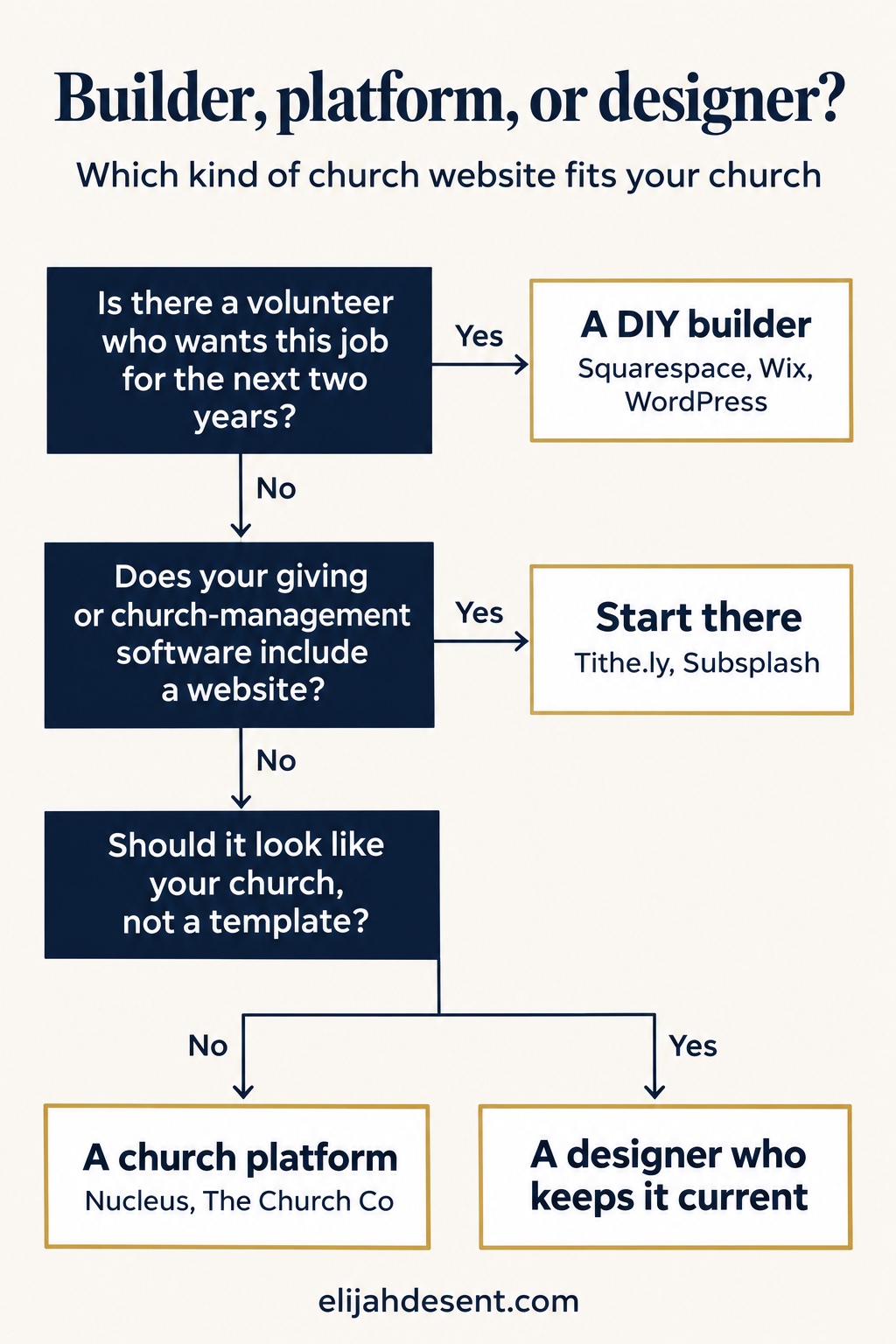
If, when you're honest, nobody in your church wants this job, a builder is the wrong purchase at any price. What you need is someone who designs the site and keeps it current. That can be a church platform's done-for-you service, a church website design company, or an independent church website designer.
That's what I do, so take this with the appropriate grain of salt. I design the site for your church specifically, show you a concept before you pay anything, and then connect it to ChatGPT or Claude so you can type "move the Wednesday service to 6:30" and the live site changes. Hosting and updates are $29 a month. You can see live examples on my church website design page. If a builder fits your church better, I'd rather you use one of the seven above and have a site that's current.
Take the comparison with you
If you're bringing this to a board or a building committee, download the one-page comparison (PDF): the table above, the three-question chart, and the five-step trial test with checkboxes. Print it, take it into the trial, and write the answers down.