On October 1st our church, Westview Baptist in Warren, Michigan, opened Toys for Tots sign-ups online. Families who live near the church fill out a short application, and we pass the approved ones on to Toys for Tots for Christmas.
For the first nine days, 18 families signed up. That's not bad, and it cost us nothing.
On the afternoon of October 10th we put a small Facebook ad behind it. In the next 48 hours, 149 more families signed up, with 333 children between them. The ad cost $39.23. That's about 26 cents a family.
But the number I care about isn't 149. It's this: every one of those families gave us a name, a phone number, an email, and permission to hear from us. Seven of them have already signed up for our Fall Fun Day. And at least one parent filled out the little form on our thank-you page to tell us they had trusted Christ.
That's what I mean by lead capture. Here's exactly how we set it up, so you can do it for your next outreach.
"Lead Capture" Isn't a Sales Word
I know the phrase sounds like something a car dealership does. For a church it means something simple: when you serve someone, leave with a way to invite them back.
Think about the last coat drive, food giveaway, or trunk-or-treat your church ran. A hundred families came through. Your people were kind to them. And when it was over, how many of those families could you have invited to your Christmas Eve service? For most churches the honest answer is zero. Nobody wrote anything down.
Lead capture fixes that. It takes five pieces:
- A free offer people actually want
- A simple sign-up page on your own website
- A thank-you page that does ministry
- A small, local Facebook ad
- A plan to invite them back
None of them is expensive. Most of them are free.
1. Start With a Free Offer People Actually Want
The offer does the heavy lifting. Toys for Tots works because a parent who's worried about Christmas will gladly fill out a form. The same is true of a back-to-school backpack giveaway, a coat drive, a free family photo day, VBS, or a trunk-or-treat.
Two rules:
- Make it genuinely free. No sermon to sit through, no service to attend first. The gift is the gift.
- Put the rules up front. Ours are at the top of the page: live within 3 miles of the church, children 13 and under, and not already signed up with another agency. Clear rules keep you from disappointing people later.
2. Build a Simple Sign-Up Page on Your Own Website
Most of the people who see your ad will be on their phones, so the page has to work on a phone first.
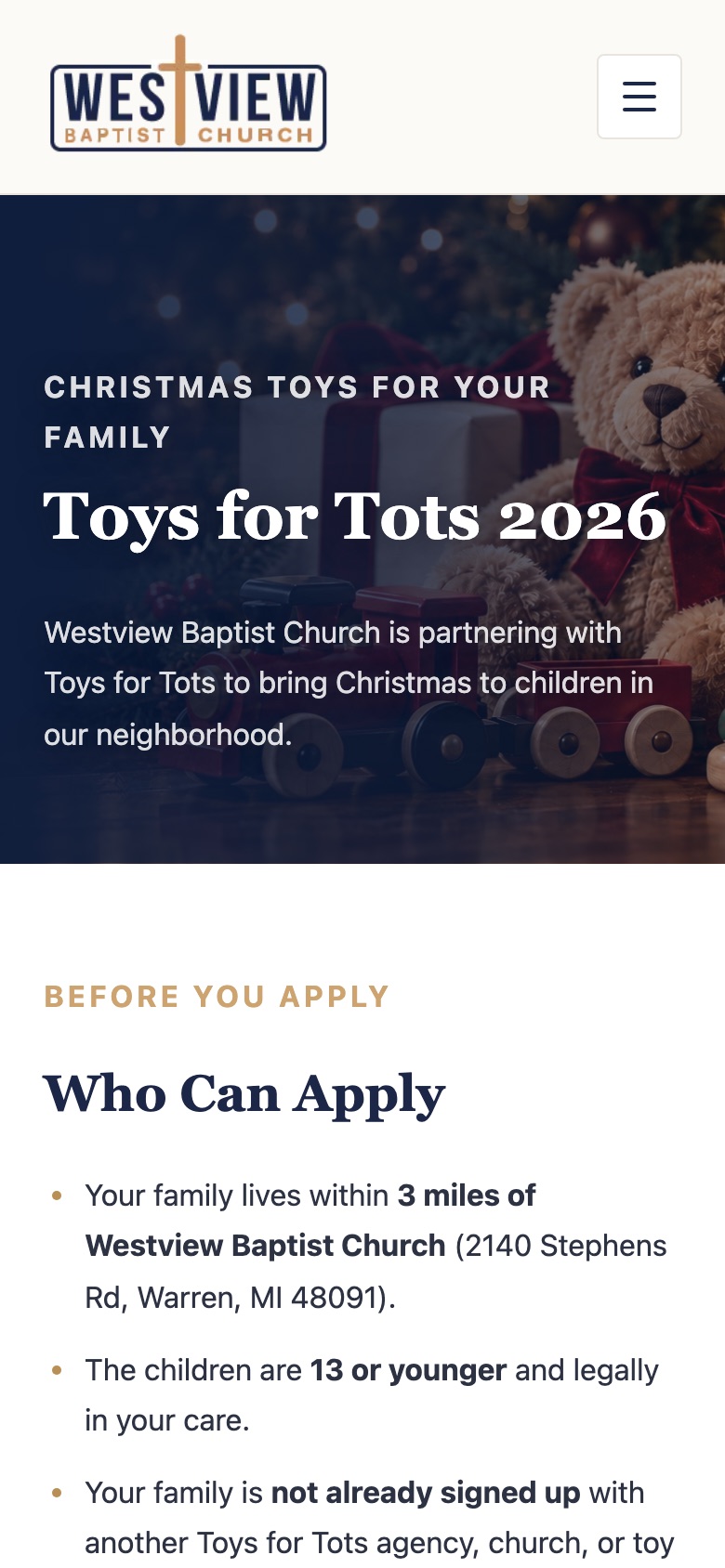
Ask only for what you need. Name, address, email, phone, and each child's name, birthday, and whether they're a boy or a girl. That's what Toys for Tots needs. Our first version also asked for household income and government assistance, copied from the paper form. We took both questions out. Every question you add is a reason for a tired parent to close the page.
Add a consent checkbox. This is the most important line on the whole form:
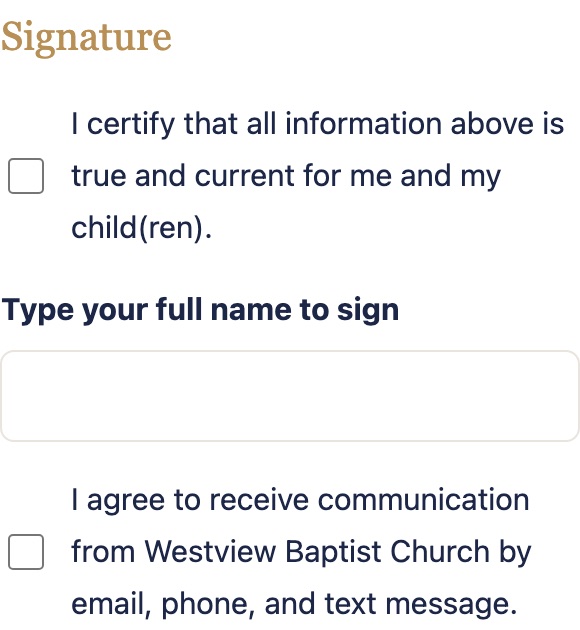
That one sentence is what makes everything in step 5 honest. It's also what keeps your emails out of spam complaints. 161 of our 167 families checked it. (The other six applied before we added it.)
Why your own website and not a Google Form or a Facebook lead form? Those work in a pinch. But on your own site you own the list, you control the thank-you page, and you can add the free Meta Pixel (more on that below). If your website can't hold a form like this, that's worth fixing before your next outreach.
Behind the scenes, check the addresses. Our form looks up every address automatically and shows how far it is from the church. That turned out to matter a lot. More on that in step 4.
3. Make the Thank-You Page Do Ministry
This is the page almost every church wastes. Someone just trusted you with their information. They're paying attention. Don't just say "Thanks, we'll be in touch."
Ours does three things.
It tells the truth about what happens next. We can't promise every family will be approved, because Toys for Tots makes the final decision. So the page says that plainly, along with who has the best chance (families who live close and can pick up the toys) and that we'll email them if they're approved.
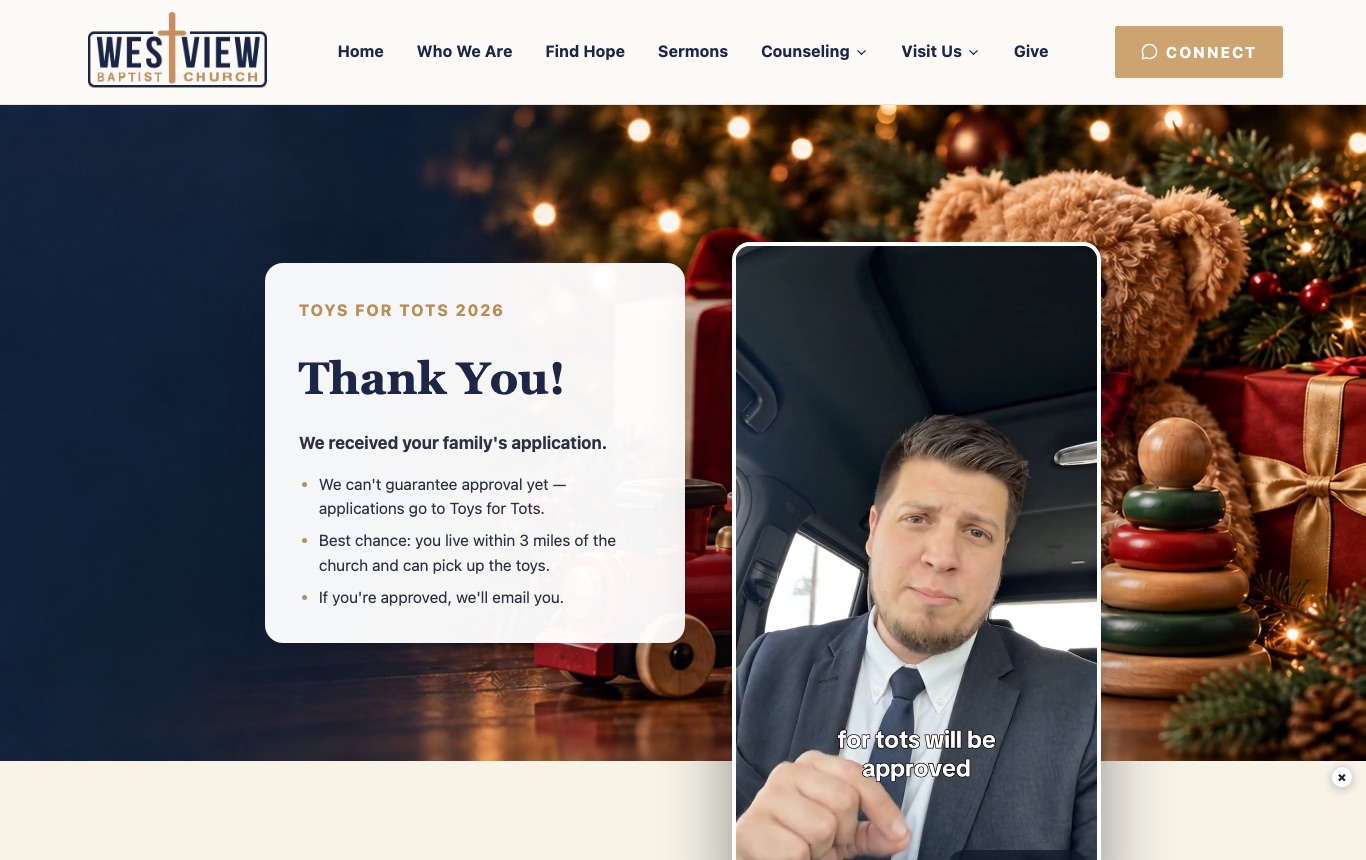
It offers something we can guarantee. Right under the video the page says: "We can't promise you toys, but God's Word promises that you can know, for sure, that you will go to heaven." Then it walks through the gospel in six short steps, each with a verse. It ends with a simple prayer and a small form that says "I Trusted Christ Today." That form goes straight to me so I can follow up personally.
It invites them to what's next. A column down the left side lists our other upcoming events, each with a sign-up link:
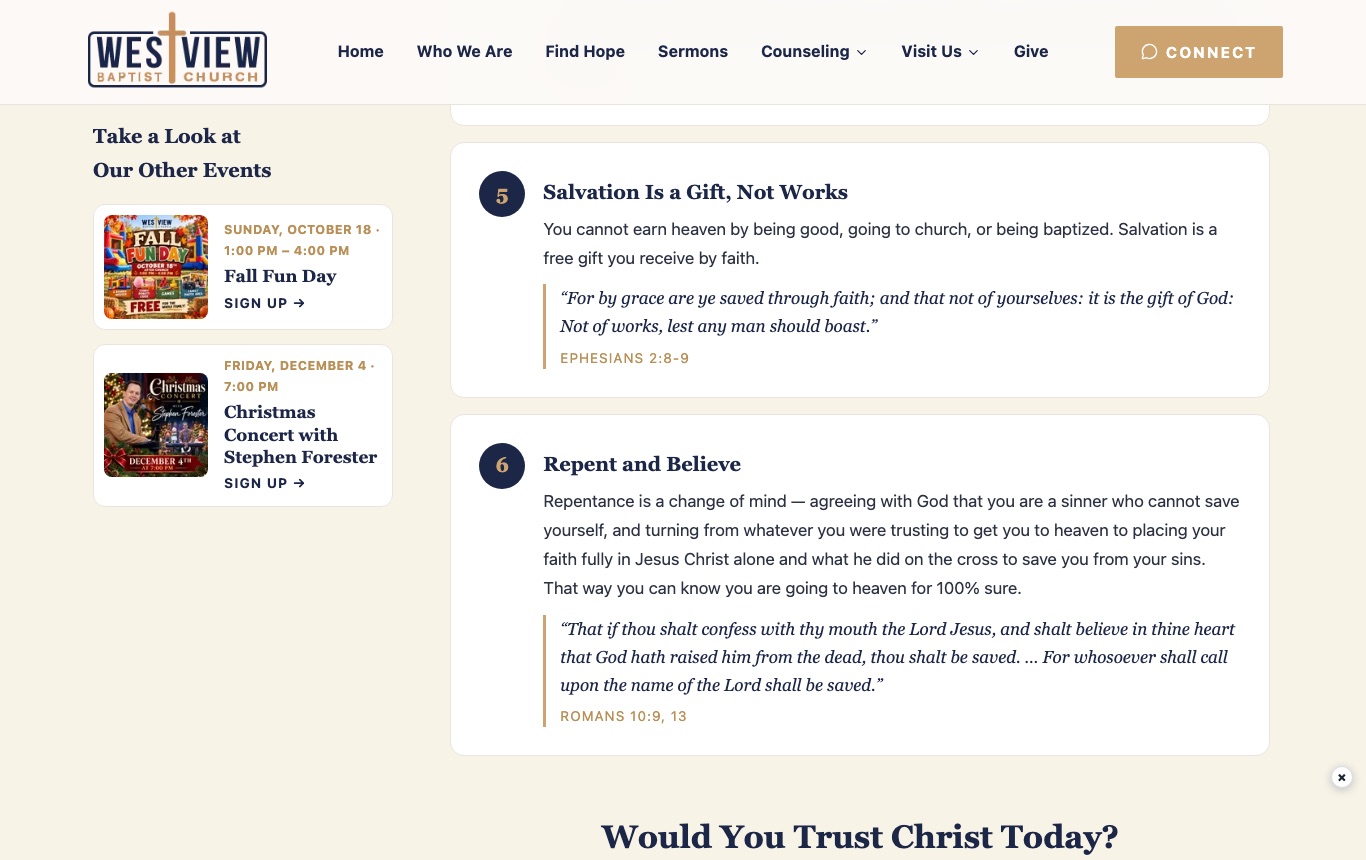
Seventeen families have signed up for our Fall Fun Day so far. Seven of them are Toys for Tots families. That's the whole point: the outreach isn't the end, it's the front door.
4. Run a Small, Local Facebook Ad
Here's the part that turned 18 families into 167.
First, put the Meta Pixel on your website
The Meta Pixel is a free piece of code from Facebook. On our site it fires an event called Complete Registration every time a family submits the form. That does two jobs:
- Facebook learns who signs up and shows the ad to more people like them.
- Facebook quietly builds a list of everyone who signed up, which you'll use in step 5.
Whoever manages your website can add it in an afternoon.
Then set up the ad
In Meta Ads Manager:
- Objective: Leads. Choose your website as the place the leads come from, and Complete Registration as the conversion event.
- Location: drop a pin on your church's address and keep the radius small, 2 to 5 miles. Your outreach serves your neighborhood, and the families you most want to see again are the ones who live a few minutes away. A small radius also makes your dollars go further, because the ad isn't spread across the whole county. Ours was 3 miles.
- Budget: small. We spent $39.23 in about two days.
- The ad itself: one square graphic with the offer in big letters, and two or three sentences of text. Say who it's for (including the radius, such as "for families within 3 miles of the church") and link straight to the sign-up page.
- Ask people to share it. End the ad with "Please share this post! Someone on your friends list may need a little help this Christmas." Every share puts your church in front of new people for free, and it comes from a friend they trust, not an ad. Ours was shared 34 times.
Here's our actual ad. One graphic:
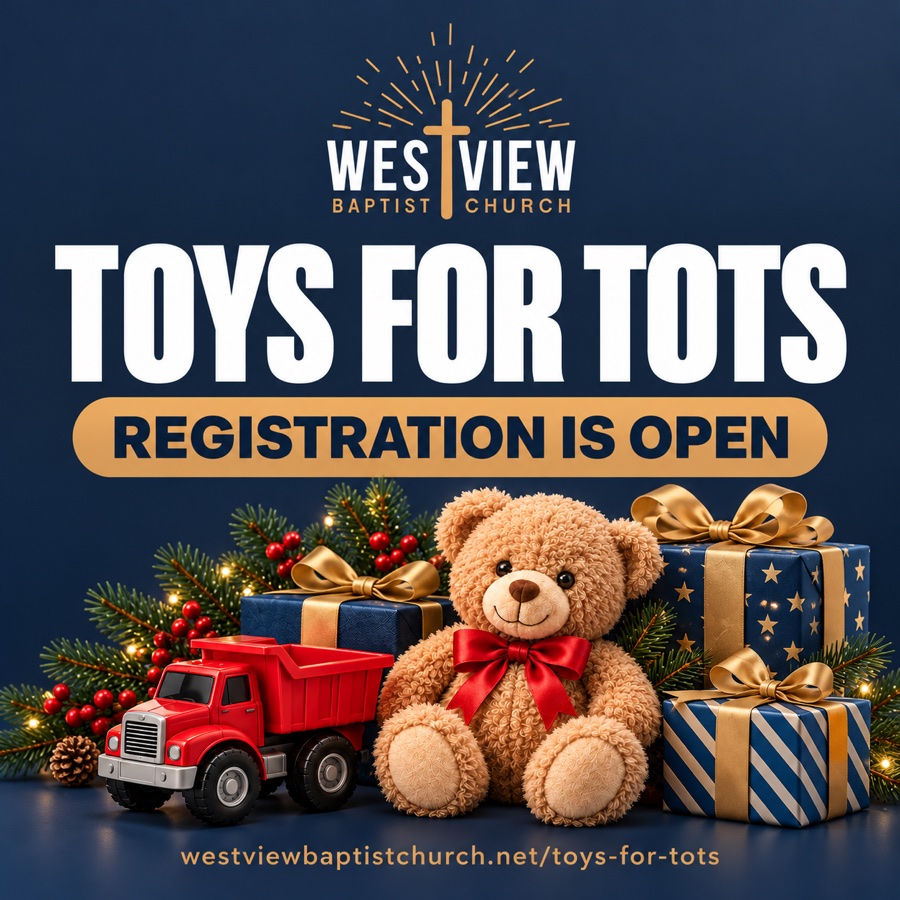
And the text that ran with it (hashtags trimmed):
🎄🎁 TOYS FOR TOTS REGISTRATION IS NOW OPEN! 🎁🎄
Westview Baptist Church is excited to help bring a little extra JOY and Christmas cheer to families in our community this holiday season! ❤️
If your family could use a helping hand with Christmas gifts for your children, we encourage you to sign up for Toys for Tots today! 🧸🚂🎁
✨ Registration is open now
✨ Spots are limited — don't wait!
✨ Complete your registration online using the link below:🔗 https://www.westviewbaptistchurch.net/toys-for-tots
📍 Westview Baptist Church, 2140 Stephens Rd., Warren, MI 48091
🎄 Please SHARE this post! You never know which family on your friends list may need a little extra help making Christmas special this year. ❤️
Help us spread the word and make Christmas brighter for children in our community! 🎁✨
Nothing fancy. It says what it is, who it's for, and exactly where to go. If we ran it again, we'd add one line near the top: "For families within 3 miles of the church."
Here's what we got:
| Toys for Tots ad | Result |
|---|---|
| Spent | $39.23 |
| People reached | 2,080 |
| Clicks to the sign-up page | 307 |
| Families who signed up | 149 |
| Children on those applications | 333 |
| Cost per family | about $0.26 |
Nearly half the people who clicked signed up. That happens when the offer is real and the page is simple.
The mistake to avoid: your radius leaks
We aimed the ad at a 3-mile circle around the church. But only 66 of the 149 families actually live within 3 miles.
Three things cause this:
- "People living in or recently in this location." That's Facebook's default. It includes anyone who drove through your town this week. Change it to "People living in this location."
- Advantage+ audience. Facebook will expand your audience beyond your settings if it thinks it can get cheaper results. If your outreach has a real boundary, turn the expansion off where Ads Manager lets you.
- Shares. Shares travel to anyone's friends, wherever they live. That's worth it, because shares are free reach, but it's why the radius belongs in the post text and on your sign-up page, not just in the ad settings.
Even with all of that, check every address yourself. Ours shows each family's distance from the church on our review screen, so we can see right away who's in range. If yours doesn't, open each address in Google Maps before you approve anyone.
5. Invite Them Back
Now you have a list of families who have said yes to hearing from you. Here are three free ways to use it, and one that costs pocket change.
Email. If your church has Google Workspace for Nonprofits (it's free; here's how to set it up), you can send a real email from your church's own address. Send one invitation per event, not a newsletter every week. Our Fall Fun Day invitation is going out to our contact list this week.
Text. A one-line reminder the day before an event ("Fall Fun Day is tomorrow at 1 PM! Bounce houses, cider, and donuts. Hope to see you!") gets more attention than any email. Only text people who checked the box.
Your thank-you page. It keeps working every time someone signs up, with no extra effort from you.
A tiny "come back" ad. Remember the list the pixel built? In Ads Manager you can make a custom audience of everyone who completed your sign-up form, then show your next event only to them. These are people who already know your church's name. Our Fall Fun Day event ad started this morning. Fifty-five cents in, it has three RSVPs.
A Few Guardrails
- Never make the gift depend on church. Don't ask anyone to attend a service to qualify. Don't hint at it either.
- Be honest on the thank-you page. If you can't promise something, say so.
- Ask only what you need. You can always ask more later, in person.
- Keep the list private. Don't share it, don't sell it, and limit who in the church can see it.
- Follow up like a pastor, not a marketer. One warm invitation per event is plenty.
What It All Cost
| Item | Cost |
|---|---|
| Facebook ad | $39.23 |
| Meta Pixel | Free |
| Email (Google Workspace for Nonprofits) | Free |
| Sign-up page, thank-you page, and address check | Part of our church website |
| Total | $39.23 |
Do This Before Your Next Outreach
Pick your next giveaway, the one you were going to run anyway. Then:
- Put a simple sign-up page for it on your website, with a consent checkbox.
- Write a thank-you page that tells the truth, shares the gospel, and lists your next event.
- Add the Meta Pixel.
- Spend $20 to $40 on a local ad with a small radius, set to "People living in this location," and ask people to share it.
- Invite every family to the next thing.
Your church is already doing the hard part, which is loving your neighbors. This just makes sure you get to see them again.
If your website can't do steps 1 through 3 yet, try the free Church Website Score. It shows in about a minute what's holding your site back. And if you'd like a website that does all of this for you, that's what I build.